Running MUTA Runs via the Frontend
The primary way to use MUTA, the Modular Usability Testing Agent, is through the shared frontend. Users start runs in the web UI, monitor logs and screenshots there, and review the resulting report artifacts without needing direct SSH or command-line access.
In the current standard setup, the frontend starts a Surfer H run on the runner environment in the background. Direct script execution remains relevant only for administration, debugging, or legacy workflows and is no longer the primary user-facing path.
Primary Way To Run MUTA: Shared Frontend
The shared frontend is the central entry point for normal usage.
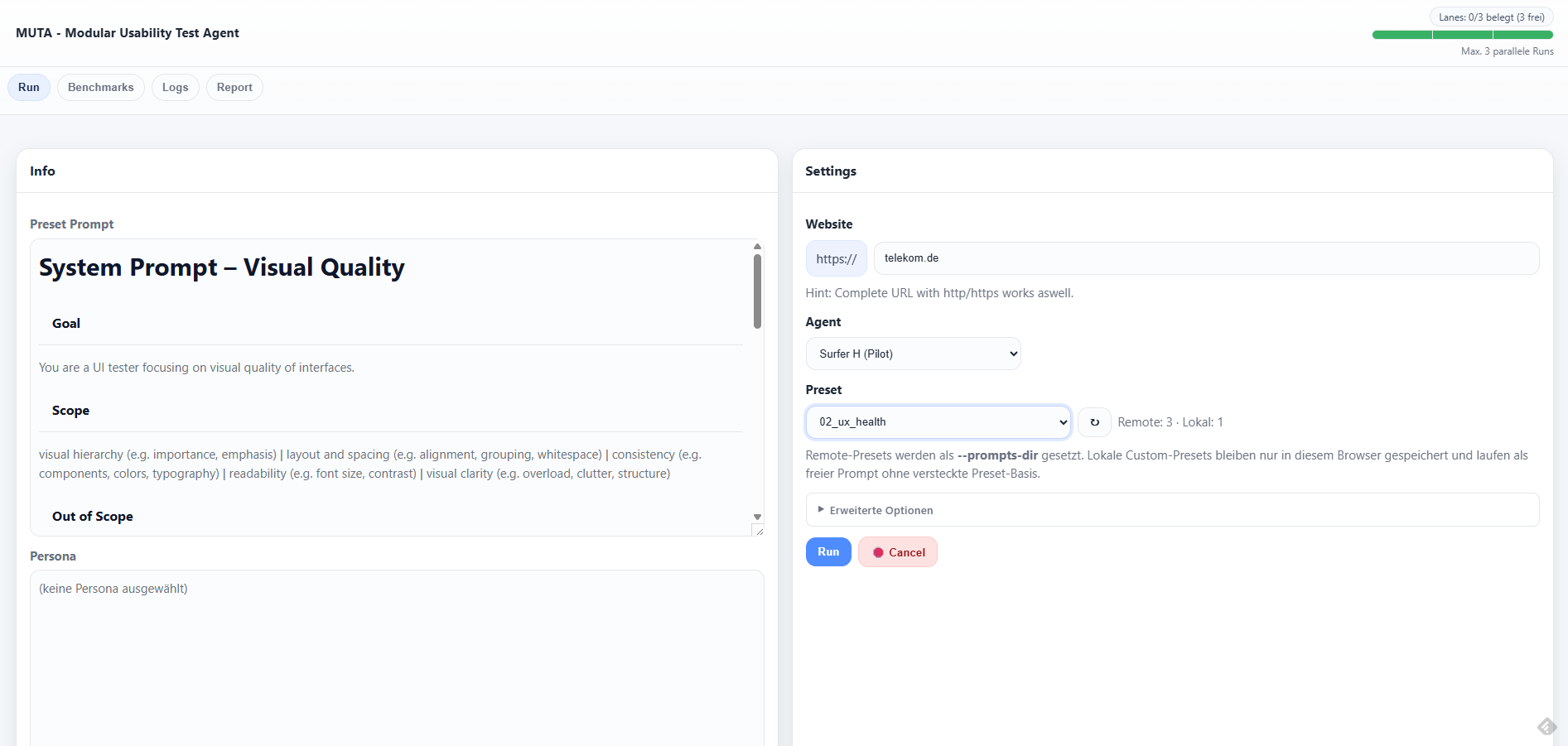
Typical user flow:
- Open the shared frontend in the browser.
- Enter the target URL and choose the desired run mode.
- Start the run from the UI.
- Monitor status, logs, screenshots, and report artifacts in the frontend.
This frontend-first flow is the intended operating model for MUTA. Users should not need SSH access to the runner for normal testing.
Current Standard Flow: Surfer H
The current standard run path starts Surfer H through the shared frontend.
From a user perspective, this means:
- the run is launched in the frontend
- execution happens on the runner environment in the background
- screenshots, logs, and report outputs are collected for later review
- the frontend remains the place where the run is observed and evaluated
Surfer H is the current standard path in this documentation. Older Agent-S-based paths may still exist in the repo, but they are not the primary user-facing route anymore.
What Happens In The Background
The frontend orchestrates execution on the runner and starts the appropriate backend path behind the scenes.
For the current standard flow, this means:
- the shared frontend submits the run request
- the runner executes the Surfer-H-specific path in the background
- model-backed reasoning and grounding happen through the configured backend endpoints
- artifacts are written to the run output directories and surfaced back through the frontend
Backend script names such as surfer_h_runner.py or uxqa_audit_cli.py are relevant for operations and troubleshooting, but they should be treated as implementation details for most readers of this page.
Available Outputs In The Frontend
The frontend is expected to expose or link the main outputs of a run, including:
- run status
- live or incremental logs
- screenshots captured during execution
- generated report artifacts
- run-specific output directories and related evidence files
This keeps the user workflow in one place: launch, observe, and review from the frontend instead of switching into terminal-driven operations.
Operational Prerequisites
For the frontend-first model to work reliably, the operating environment still needs the underlying runtime pieces in place:
- the shared frontend must be deployed on the runner environment
- the runner must have access to its browser and GUI automation lane
- the configured model endpoints must be reachable from the runner
- shared usage defaults such as authentication, concurrency limits, and script allowlists should be configured appropriately
These are operational requirements for the platform, not manual setup steps that normal users are expected to perform.
Admin And Legacy Execution Paths
Direct script execution is still relevant in a few cases:
- administration of the runner environment
- debugging failing runs or backend behavior
- validating legacy Agent-S-based flows
- comparing behavior outside the standard frontend path
This page no longer treats those script-level entry points as the recommended way to run MUTA. If direct execution needs to be documented in more detail, it should live in an explicitly operational or legacy-oriented section.
Historical Script References
Older script-oriented references still exist in the repo and may appear in legacy documentation, for example:
gui_agent_cli.py1_UI_check_AS3.py1_UI_functional_correctness_check.py2_UX_visual_quality_audit.py3_UX_taskflow_newsletter_signup.py
They should be understood as historical or technical references, not as the main user-facing start path for the current MUTA documentation.
Related Documentation
For the current shared-frontend and Surfer-H-oriented operating model, use these documents together with this page:
- shared deployment and operations:
Frontend/IPCEI-UX-Agent-Frontend/SHARED-DEPLOYMENT.md - shared frontend context:
docs/story-029-001-context.md - UXQA frontend flags context:
docs/story-030-001-context.md - Surfer H infrastructure view:
docs/Surfer H/surfer-h-infrastructure-overview.md - Surfer H technical implementation map:
docs/Surfer H/surfer-h-implementation-map.md - current model and infrastructure framing: Model Stack
Notes On Model Usage
Model and infrastructure details have changed over time and still contain some legacy terminology in older pages.
For this documentation set, the important rule is:
- treat the frontend as the primary user-facing entry point
- treat Surfer H as the current standard run path
- treat direct script execution and older model references as operational or historical context unless a page explicitly states otherwise