MUTA
General documentation for MUTA, the Modular Usability Testing Agent
This section contains the core documentation for MUTA, the Modular Usability Testing Agent, and explains how the current frontend-first testing flow works.
MUTA is an application for testing other applications for usability with the help of AI agents. In the current setup, users interact with MUTA through the shared frontend, where they start runs, monitor logs and screenshots, and review resulting artifacts.
The current standard run path uses Surfer H behind the frontend. Direct script execution remains relevant for administration, debugging, and legacy workflows, but it is no longer the primary user-facing entry point.
1 - Running MUTA Runs via the Frontend
How to start, monitor, and review MUTA runs through the shared frontend
The primary way to use MUTA, the Modular Usability Testing Agent, is through the shared frontend. Users start runs in the web UI, monitor logs and screenshots there, and review the resulting report artifacts without needing direct SSH or command-line access.
In the current standard setup, the frontend starts a Surfer H run on the runner environment in the background. Direct script execution remains relevant only for administration, debugging, or legacy workflows and is no longer the primary user-facing path.
Primary Way To Run MUTA: Shared Frontend
The shared frontend is the central entry point for normal usage.
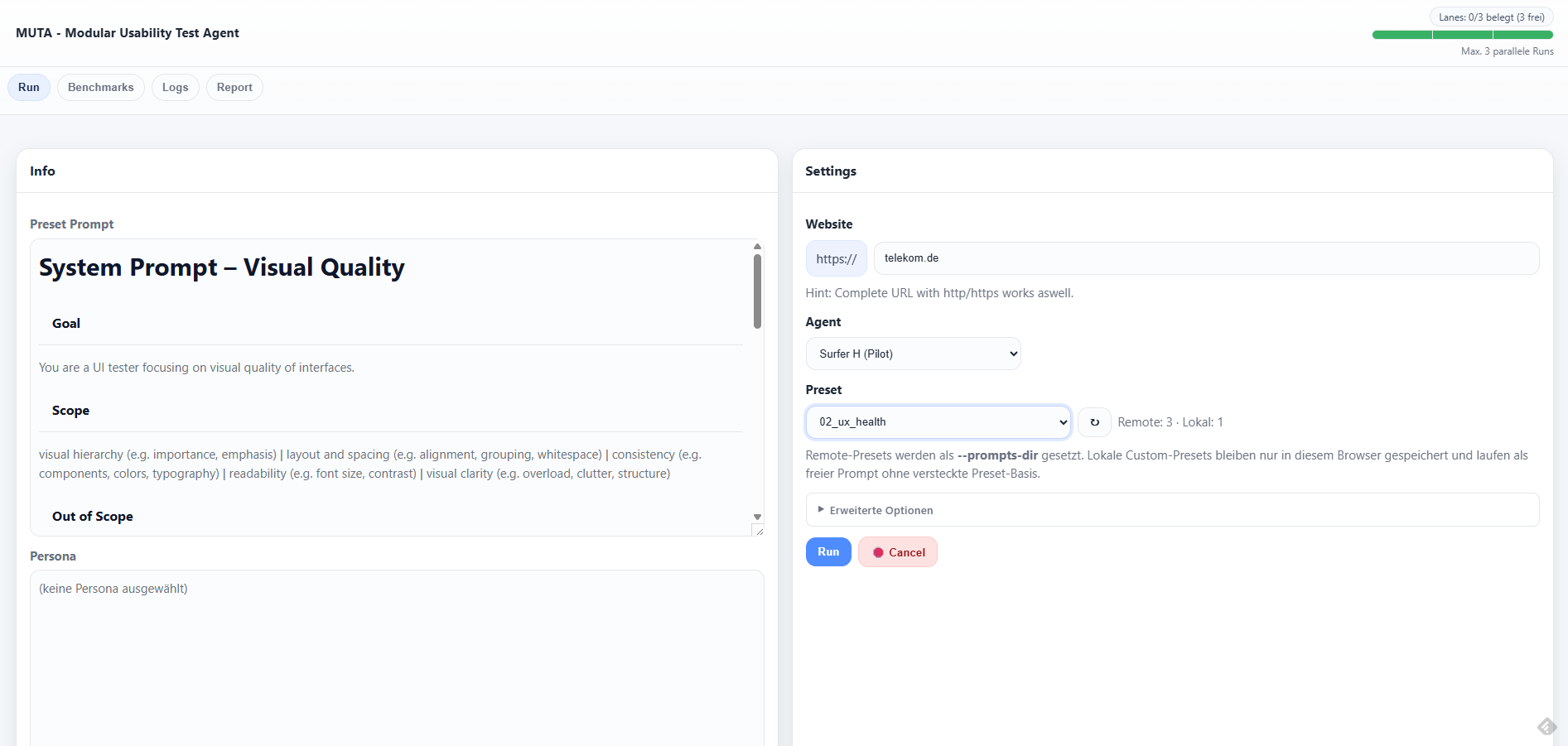
Typical user flow:
- Open the shared frontend in the browser.
- Enter the target URL and choose the desired run mode.
- Start the run from the UI.
- Monitor status, logs, screenshots, and report artifacts in the frontend.
This frontend-first flow is the intended operating model for MUTA. Users should not need SSH access to the runner for normal testing.
Current Standard Flow: Surfer H
The current standard run path starts Surfer H through the shared frontend.
From a user perspective, this means:
- the run is launched in the frontend
- execution happens on the runner environment in the background
- screenshots, logs, and report outputs are collected for later review
- the frontend remains the place where the run is observed and evaluated
Surfer H is the current standard path in this documentation. Older Agent-S-based paths may still exist in the repo, but they are not the primary user-facing route anymore.
What Happens In The Background
The frontend orchestrates execution on the runner and starts the appropriate backend path behind the scenes.
For the current standard flow, this means:
- the shared frontend submits the run request
- the runner executes the Surfer-H-specific path in the background
- model-backed reasoning and grounding happen through the configured backend endpoints
- artifacts are written to the run output directories and surfaced back through the frontend
Backend script names such as surfer_h_runner.py or uxqa_audit_cli.py are relevant for operations and troubleshooting, but they should be treated as implementation details for most readers of this page.
Available Outputs In The Frontend
The frontend is expected to expose or link the main outputs of a run, including:
- run status
- live or incremental logs
- screenshots captured during execution
- generated report artifacts
- run-specific output directories and related evidence files
This keeps the user workflow in one place: launch, observe, and review from the frontend instead of switching into terminal-driven operations.
Operational Prerequisites
For the frontend-first model to work reliably, the operating environment still needs the underlying runtime pieces in place:
- the shared frontend must be deployed on the runner environment
- the runner must have access to its browser and GUI automation lane
- the configured model endpoints must be reachable from the runner
- shared usage defaults such as authentication, concurrency limits, and script allowlists should be configured appropriately
These are operational requirements for the platform, not manual setup steps that normal users are expected to perform.
Admin And Legacy Execution Paths
Direct script execution is still relevant in a few cases:
- administration of the runner environment
- debugging failing runs or backend behavior
- validating legacy Agent-S-based flows
- comparing behavior outside the standard frontend path
This page no longer treats those script-level entry points as the recommended way to run MUTA. If direct execution needs to be documented in more detail, it should live in an explicitly operational or legacy-oriented section.
Historical Script References
Older script-oriented references still exist in the repo and may appear in legacy documentation, for example:
gui_agent_cli.py1_UI_check_AS3.py1_UI_functional_correctness_check.py2_UX_visual_quality_audit.py3_UX_taskflow_newsletter_signup.py
They should be understood as historical or technical references, not as the main user-facing start path for the current MUTA documentation.
For the current shared-frontend and Surfer-H-oriented operating model, use these documents together with this page:
- shared deployment and operations:
Frontend/IPCEI-UX-Agent-Frontend/SHARED-DEPLOYMENT.md - shared frontend context:
docs/story-029-001-context.md - UXQA frontend flags context:
docs/story-030-001-context.md - Surfer H infrastructure view:
docs/Surfer H/surfer-h-infrastructure-overview.md - Surfer H technical implementation map:
docs/Surfer H/surfer-h-implementation-map.md - current model and infrastructure framing: Model Stack
Notes On Model Usage
Model and infrastructure details have changed over time and still contain some legacy terminology in older pages.
For this documentation set, the important rule is:
- treat the frontend as the primary user-facing entry point
- treat Surfer H as the current standard run path
- treat direct script execution and older model references as operational or historical context unless a page explicitly states otherwise
2 - Model Stack
Current model split for the frontend-first MUTA flow and its Surfer H execution path
For a visual overview of how the models interact with the VNC-based GUI automation loop, see: Workflow Diagram
Requirement
MUTA inherits the same core requirement as the earlier Autonomous UAT Agent work: the solution must use open-source models from European companies for the target architecture.
Current Documentation Scope
This page documents the model split used by the current frontend-first MUTA flow described in this documentation section.
The current standard path starts from the shared frontend and executes Surfer H on the runner in the background.
Current Standard Split
- Thinking / planning: Ministral
- Grounding / coordinates: Holo-oriented grounding endpoint on the A40 host
The run loop uses one model path to decide what to do next and another path to translate UI intent into pixel-accurate coordinates on the current screenshot. This split remains essential for reliable GUI automation because planning and grounding are different problems and benefit from different model capabilities.
Why split models?
- Reasoning models optimize planning and textual decision making
- Vision/grounding models optimize stable coordinate output
- Separation reduces “coordinate hallucinations” and makes debugging easier
Current state in repo
- Some scripts and docs still reference historical Claude and Pixtral experiments.
- Some newer shared-frontend and system documents still mention Pixtral on the A40 host.
- For this documentation section, the active MUTA narrative follows the Surfer-H-oriented split documented in the Surfer H notes: Ministral for thinking and a Holo-oriented grounding endpoint for UI grounding.
- Older Claude- or Pixtral-based references should therefore be read as historical, experimental, or belonging to adjacent documentation tracks unless they explicitly state otherwise.
Current Configuration For This Documentation Track
Thinking model: Ministral 3 8B (Instruct)
- HuggingFace model card: https://huggingface.co/mistralai/Ministral-3-8B-Instruct-2512
- Runs on OTC (Open Telekom Cloud) ECS:
ecs_ministral_L4 (public IP: 164.30.28.242)- Flavor: GPU-accelerated | 16 vCPUs | 64 GiB |
pi5e.4xlarge.4 - GPU: 1 × NVIDIA Tesla L4 (24 GiB)
- Image:
Standard_Ubuntu_24.04_amd64_bios_GPU_GitLab_3074 (Public image)
- Deployment: vLLM OpenAI-compatible endpoint (chat completions)
- Endpoint env var:
vLLM_THINKING_ENDPOINT - Current server (deployment reference):
http://164.30.28.242:8001/v1
Operational note: vLLM is configured to auto-start on server boot (OTC ECS restart) via systemd.
Key serving settings (vLLM):
--gpu-memory-utilization 0.90--max-model-len 32768--host 0.0.0.0--port 8001
Key client settings (historically script-driven, now runner/frontend-driven):
model: /home/ubuntu/ministral-vllm/models/ministral-3-8btemperature: 0.0
Grounding model: Holo 1.5-7B
- HuggingFace model card: https://huggingface.co/holo-1.5-7b
- Runs on OTC (Open Telekom Cloud) ECS:
ecs_holo_A40 (public IP: 164.30.22.166)- Flavor: GPU-accelerated | 48 vCPUs | 384 GiB |
g7.12xlarge.8 - GPU: 1 × NVIDIA A40 (48 GiB)
- Image:
Standard_Ubuntu_24.04_amd64_bios_GPU_GitLab_3074 (Public image)
- Deployment: vLLM OpenAI-compatible endpoint (multimodal grounding)
- Endpoint env var:
vLLM_VISION_ENDPOINT - Current server (deployment reference):
http://164.30.22.166:8000/v1
Key client settings (grounding / coordinate space):
model: holo-1.5-7b- Native coordinate space:
3840×2160 (4K) - Client grounding dimensions:
grounding_width: 3840grounding_height: 2160
Notes
- The shared frontend remains the primary user-facing entry point; users do not need to select models directly.
- Model and endpoint details matter mainly for operations, debugging, and architecture discussions.
- If another documentation track describes a different A40 model assignment, treat that as a parallel or older reference and reconcile it explicitly before presenting it as the current MUTA standard.
3 - Agent Workflow Diagram
Visual infrastructure and workflow overview for MUTA, based on the shared frontend and split-model execution path
This page provides a visual sketch of the current MUTA runtime and execution flow.
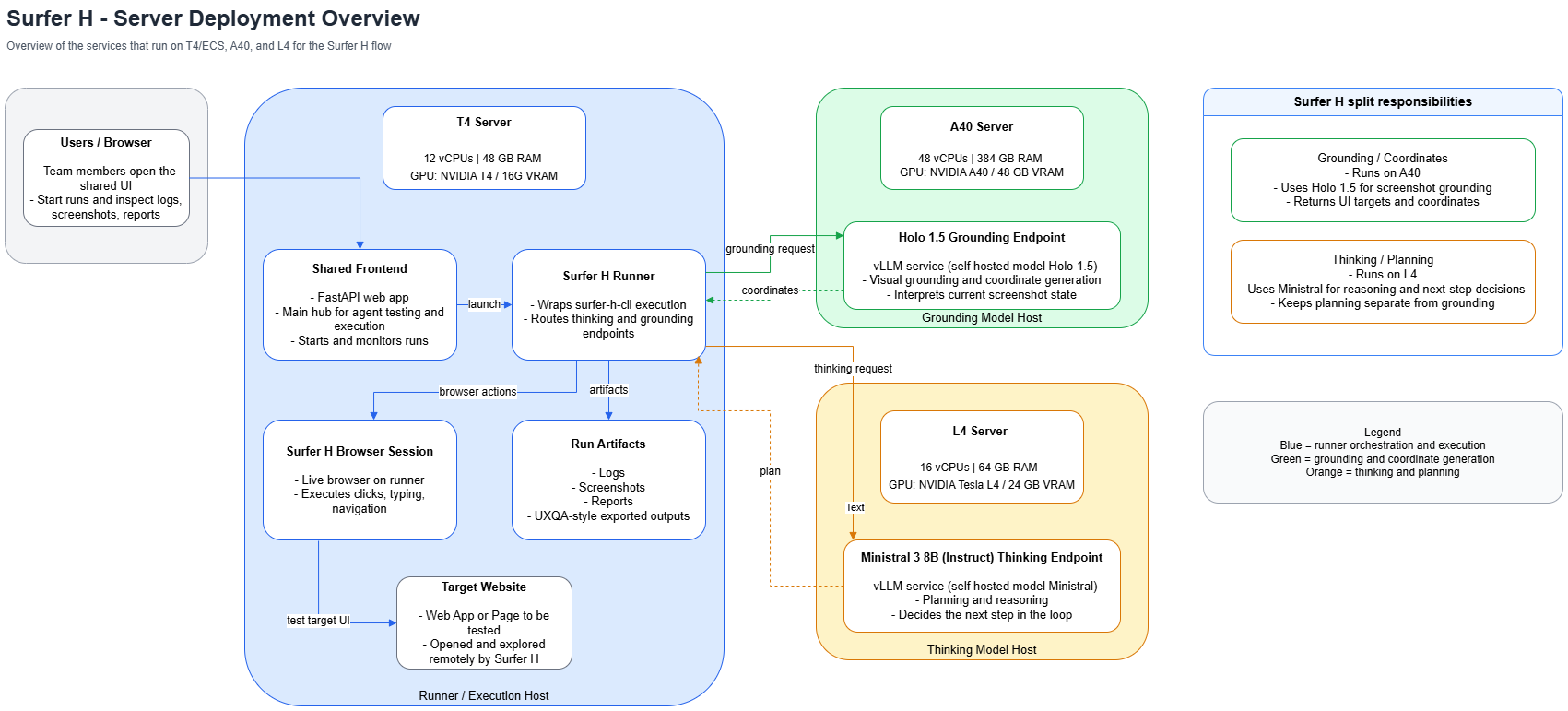
The diagram below reflects the currently preferred architecture view: users start and inspect runs in the shared frontend, execution happens on the T4 runner, and the split-model path delegates grounding and reasoning to separate hosts.
Split Responsibilities
The runner host keeps the user-facing control plane and the browser execution environment together in one place.
The split-model responsibilities are:
- Grounding / vision on A40: receives screenshots and visual context, then returns grounded visual information.
- Thinking / reasoning on L4: produces planning, judgement, and step-level reasoning.
- Runtime on T4: orchestrates the loop, drives the browser, and persists artifacts.
Notes
- The shared frontend is the central user entry point for MUTA.
- The runner on T4 is the execution host for the standard Surfer H path.
- The A40 host handles visual grounding.
- The L4 host handles reasoning.